

When it comes to improving search rankings, many website owners focus on backlinks, keywords, and content length while overlooking one of the most important on-page elements: the H1 tag. A well-optimized H1 helps search engines understand the main topic of a page and gives visitors a clear reason to keep reading. It acts as the headline that connects user intent with your content, making it essential for both SEO and user experience.
In today’s competitive digital landscape, using SEO H1 Tags Best Practices can improve content clarity, strengthen topical relevance, and support higher visibility in search results. Whether you run a blog, business website, eCommerce store, or portfolio, the right H1 strategy can make your pages easier to understand, easier to navigate, and more likely to rank.
This guide explains how H1 tags work, common mistakes to avoid, and the proven techniques that help websites create stronger page structures and better search performance in 2026.
What Is an H1 Tag in SEO?
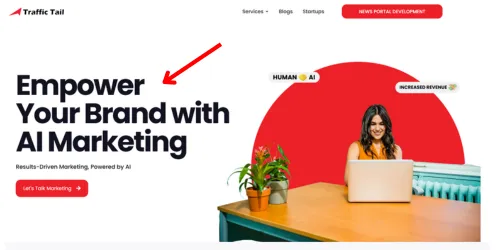
An H1 tag is the main HTML heading element on a webpage. It sits inside the <body> of your HTML and looks like this:
<h1>SEO H1 Tags Best Practices: The Complete 2026 Guide</h1>
Visually, it appears as the large, primary title at the top of a page. Structurally, it tells both users and search engines: this is the core topic of what you are about to read.
HTML supports six heading levels — <h1> through <h6>. The H1 is the most important. Think of it as the chapter title in a book; everything beneath it (H2s, H3s) are the sections and sub-sections that support and expand on that central theme.
Why the H1 Still Matters in 2026
There has been ongoing debate about whether H1 tags directly influence Google rankings. The honest answer: they are not a magic ranking lever on their own. But they remain a foundational structural signal for three clear reasons:
- Topic Clarity — Google uses the H1 to confirm the primary subject of a page, especially for newer or less-established content.
- AI Overview Eligibility — Structured, well-labelled content is significantly easier for AI systems like Gemini to parse and cite in generated answers.
- Accessibility — Screen readers use H1 tags as navigation anchors, making your content usable for visually impaired visitors — a factor that supports E-E-A-T signals.
A 2026 case study by Rankability found that 93.5% of top-ranking pages use a single H1 tag per page — not because Google penalises multiple H1s, but because pages that follow clear structural conventions tend to rank well across the board.
H1 Tag vs. Title Tag: What’s the Difference?
This is one of the most common areas of confusion in on-page SEO, so let’s be direct about it.
| Factor | H1 Tag | Title Tag |
| Where it appears | On the webpage itself, visible to visitors | In Google’s search results (SERPs) and browser tabs |
| Primary job | Define the page topic for users who’ve already landed | Attract clicks from people browsing search results |
| SEO role | Signals content structure and relevance to crawlers | Directly influences click-through rate (CTR) |
| Length | Flexible — ideally 50–70 characters, but not a hard rule | 50–60 characters to avoid SERP truncation |
| Keyword placement | Include the primary keyword naturally | Include the primary keyword near the beginning |
| Should they match? | Thematically consistent, not necessarily identical | — |
Key 2026 update: Google may now display your H1 as the SERP title link if it determines your H1 better matches the query than your title tag. This means a well-crafted H1 can directly affect your click-through rate — a detail that changes how you should think about writing it.
HTML Heading Hierarchy: H1 Through H6 Explained
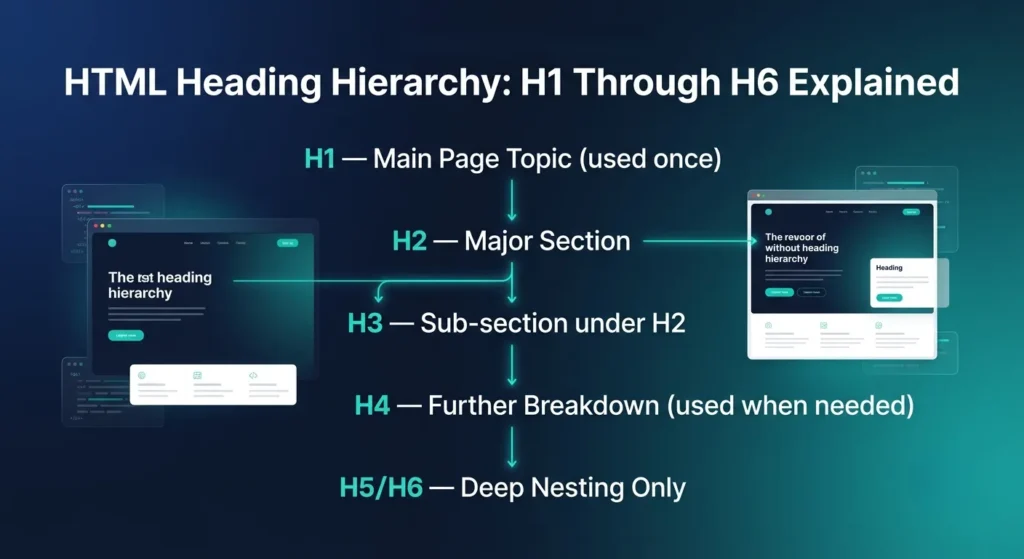
Headings in HTML are hierarchical. A well-structured page follows a logical, nested order:
H1 — Main Page Topic (used once)
H2 — Major Section
H3 — Sub-section under H2
H4 — Further breakdown (used when truly needed)
H5 / H6 — Rarely needed; deep nesting only
Rules That Still Hold in 2026:
- Never skip heading levels. Going from H2 to H4 breaks the structural logic and can confuse both search engines and screen readers.
- Use headings for structure, not styling. If you’re making text bigger for visual reasons, use CSS. Heading tags should reflect content architecture, not design preferences.
- H2s should carry major thematic sections. Structure your H2s around questions or topics that users actually search for — this is increasingly valuable as AI-generated summaries pull from well-labelled sections.
- H3s break down H2 sections. Most well-structured articles don’t need to go beyond H3.
Why H1 Tags Are Important for SEO in 2026
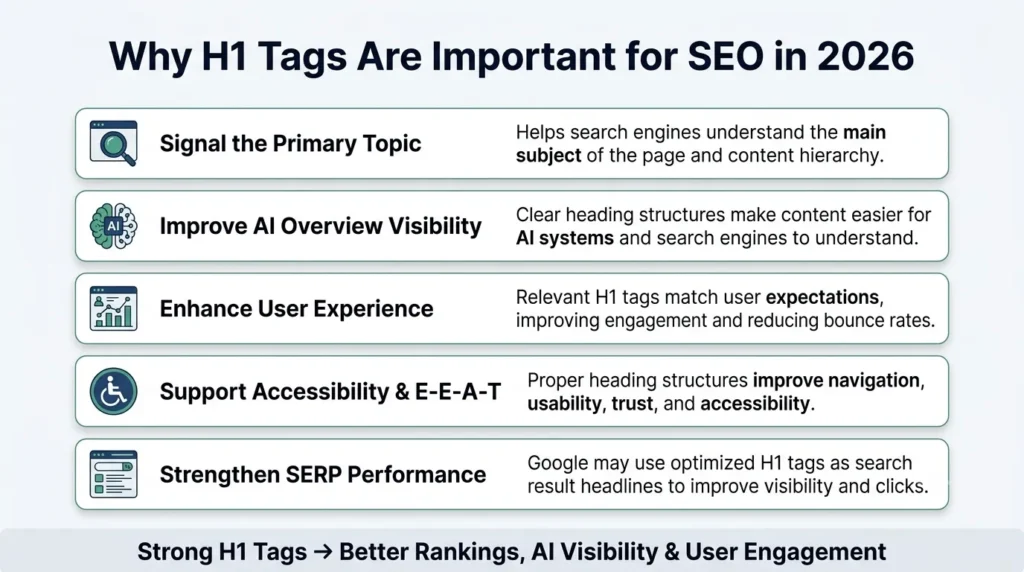
1. They Signal the Primary Topic to Search Engines
When Google crawls your page, it processes the DOM from top to bottom. The H1 initiates the content hierarchy. It tells the crawler: here is the main subject, and everything that follows supports it. Without a clear H1, Google has to infer the topic from surrounding content — which is less reliable and gives your competitors an advantage.
2. They Influence AI Overview Eligibility
This is the biggest shift for 2026. Google’s AI Overviews and large language models like Gemini pull structured data from web pages to generate summaries. Pages with clear H1-H2-H3 hierarchies are significantly easier for these systems to parse and cite. A strong H1 that precisely matches the query’s intent dramatically increases your chances of being featured.
3. They Affect User Behaviour and Bounce Rate
When a user clicks a search result and lands on your page, the H1 is the first thing they read. If it matches what they expected to find, they stay. If it doesn’t, they leave. That behaviour — dwell time, bounce rate — feeds back into how Google evaluates your page over time.
4. They Support Accessibility and E-E-A-T
Screen readers use H1 tags as navigation anchors for visually impaired users. Properly structured headings improve inclusivity and usability — factors that align with Google’s E-E-A-T (Experience, Expertise, Authoritativeness, Trustworthiness) framework.
5. They Are a Fallback SERP Title
As noted above, if Google decides your H1 better represents the search query than your title tag, it may use your H1 as the displayed SERP headline. A poorly written H1 can hurt your click-through rates even if your title tag is perfectly optimised.
Competitor Analysis: What Top-Ranking Pages Are Doing Differently
After reviewing the pages currently competing for “SEO H1 tags best practices” in 2026, here is what they are doing that IndiMarketer’s current version does not fully address:
| Competitive Gap | What Top Competitors Cover | Action for IndiMarketer |
| AI Overview angle | Devtrios, W3era explicitly address how H1s feed LLMs and AI Overviews | Add a dedicated section on H1s and AI search |
| Auditing framework | DevTrios provides a technical H1 audit workflow | Add a practical H1 audit checklist |
| Myth-busting | Collaborada and Rankability debunk outdated H1 “rules” with Google-sourced evidence | Add a “Common Myths” section with sourced debunking |
| Data citations | Rankability’s 93.5% single-H1 stat is cited across 4+ competitors | Reference this data point explicitly |
| Headless CMS / SPA | DevTrios covers H1s in technical environments | Brief mention for developer audience |
| Content-type specificity | Most competitors generalise; SEOProFreelancer lists per content type | Expand the content-type section with examples |
| Step-by-step audit | Backlinko, Semrush mention audit tools | Add a practical “How to Audit Your H1 Tags” section |
SEO H1 Tags Best Practices: The Complete 2026 Checklist
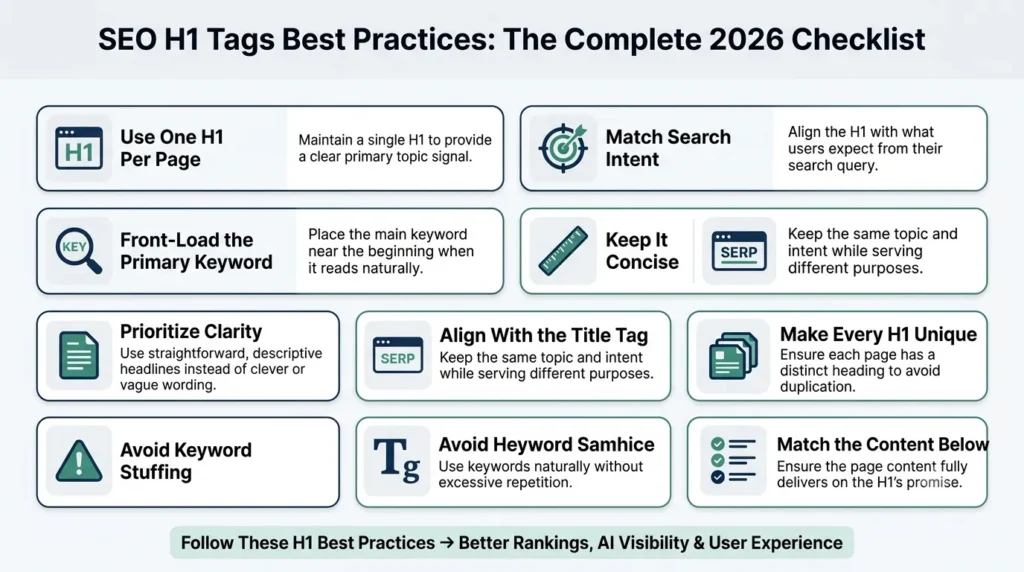
1. Use One H1 Per Page
Use exactly one H1 per URL. While HTML5 technically permits multiple H1s within separate <section> or <article> elements, the practical reality is that multiple H1s dilute your primary topic signal, create semantic ambiguity, and make it harder for screen readers to navigate.
Data backs this up: 93.5% of top-ranking pages use a single H1 tag. Stick to one.
2. Match the H1 to Search Intent — Not Just the Keyword
Including a keyword in your H1 matters. But the intent behind it matters more. Before writing your H1, ask: what is the user actually trying to accomplish with this search?
- Informational intent: “What Are H1 Tags and Why Do They Matter for SEO?”
- Navigational intent: “H1 Tag Best Practices Guide – IndiMarketer”
- Commercial/transactional intent: “Best H1 Tag Optimisation Services for E-commerce in 2026”
Your H1 should match not just the keyword, but the type of answer the user expects.
3. Place the Primary Keyword Near the Beginning
Front-loading your primary keyword gives stronger topical signals to search engines. It also increases visual salience for users scanning the page.
Weak: “A Complete Guide to Best Practices for H1 Tags in SEO” Stronger: “SEO H1 Tags Best Practices: A Complete 2026 Guide”
That said, never force it. A naturally flowing H1 that includes the keyword is always better than a stilted one where the keyword appears first.
4. Keep It Concise — Aim for 50–70 Characters
Long H1s dilute focus and reduce scannability. A concise, descriptive H1 is easier to read at a glance, renders well on mobile screens, and can be used by Google as a SERP title without truncation.
Aim for 50–70 characters as a guideline — not a hard rule. If your H1 needs to be slightly longer to be accurate, prioritise accuracy.
5. Write for Clarity, Not Creativity
Clever headlines may look appealing but they often obscure the topic. Your H1 must instantly communicate the subject of the page. When in doubt, be descriptive.
Vague: “The Heading That Could Change Everything” Clear: “H1 Tag SEO Best Practices: How to Write Headings That Rank”
6. Align H1 with Your Title Tag (But Don’t Make Them Identical)
Your H1 and title tag should share the same topical message and intent, but they serve different purposes. The title tag is optimised for SERP click-through rate; the H1 is optimised for the user who has already landed on your page.
- Title Tag: “SEO H1 Tags Best Practices 2026”
- H1: “SEO H1 Tags Best Practices: The Complete 2026 Guide for Higher Rankings”
7. Use Title Case
Use title case for your H1 — capitalising the first letter of each major word. It is the standard editorial convention and makes headings more scannable and professional.
Sentence case: “Seo h1 tags best practices for 2026” Title case: “SEO H1 Tags Best Practices for 2026” ✓
8. Make Each Page’s H1 Unique
Every page on your site should have a distinct H1 that clearly differentiates it from others. Duplicate H1 tags confuse crawlers and weaken topical differentiation across your site architecture.
Use a site audit tool (Semrush, Ahrefs, or Screaming Frog) to identify duplicate H1 issues across your domain.
9. Avoid Keyword Stuffing
Keyword stuffing in your H1 does not help — it hurts. It reduces readability for users, looks unnatural, and can be interpreted as a manipulation signal.
Stuffed: “H1 Tags SEO H1 Tags Best Practices H1 SEO 2026” Natural: “SEO H1 Tags Best Practices: A Complete 2026 Guide”
10. Align the H1 With What Follows on the Page
Your H1 is a promise to the reader. The content that follows must fulfil it. Misleading H1s increase bounce rates. Consistent H1-to-content alignment improves dwell time and trust — both positive ranking signals.
H1 Tags and AI Search in 2026: The New Priority
This is the most important update for 2026 and it is underrepresented in most H1 guides.
Google’s AI Overviews, Perplexity, ChatGPT search, and similar AI-powered tools scrape and parse your webpage when generating answers. They rely heavily on structural signals — including your H1 — to understand what your content is about and whether it answers the query accurately.
What This Means for Your H1 Strategy:
- Your H1 should precisely match or closely mirror the query being asked. AI systems look for query-intent alignment at the heading level.
- Your H2s should be structured as questions that users actually search for — AI summaries frequently pull from question-format subheadings.
- Avoid ambiguity in your H1. Vague headings get skipped by AI summarisation systems in favour of clearer alternatives.
- Ensure your H1 appears prominently in the DOM, not buried in JavaScript-rendered content. AI crawlers and some headless browser tools struggle with late-rendered headings.
If your content is structured clearly — with a precise H1, logical H2s, and specific H3s — your page is significantly more likely to be cited in AI-generated answers.
H1 Tag Examples by Content Type
Different pages require different H1 approaches. Here are practical examples:
- Blog Posts: Focus on the topic + keyword + year where relevant.
- “SEO H1 Tags Best Practices: A Complete 2026 Guide for Higher Rankings”
- “Best On Page SEO Tools to Boost Your Website Rankings”
- Product Pages: Include the product name, key differentiator, or use case.
- “Sony WH-1000XM6 Wireless Headphones — Noise Cancelling for Work & Travel”
- Category Pages: Broad, keyword-inclusive, descriptive.
- “Wireless Headphones — Shop All Models & Brands”
- Landing Pages: Benefit-driven and conversion-focused.
- “Double Your Organic Traffic With Our white label SEO Audit Service“
- Service Pages: Audience-specific and outcome-focused.
- “SEO Services for E-commerce Brands in India”
- “Best SEO Companies for Small Businesses Growth”
- Homepage: Brand-focused with a core value proposition.
- “IndiMarketer — Data-Driven SEO & Digital Marketing for Indian Businesses”
- FAQ / Informational Pages: Question-based, matching featured snippet opportunities.
- “What Is an H1 Tag and How Does It Affect SEO Rankings?”
Common H1 Tag Mistakes to Avoid in 2026
| Mistake | Why It Hurts | Fix |
| Multiple H1s | Dilutes topic signal, confuses crawlers and screen readers | Use exactly one H1 per page |
| Missing H1 | Leaves search engines without a clear topic anchor | Add a descriptive H1 to every page |
| Keyword stuffing | Unnatural, may trigger spam signals | One natural mention of the primary keyword |
| Duplicate H1s across pages | Weakens topical differentiation | Make every H1 unique |
| H1 ≠ page content | Increases bounce rate and erodes trust | Ensure H1 accurately reflects what follows |
| Using H1 for styling | Structurally meaningless; breaks hierarchy | Use CSS for visual design; use H1 for structure |
| Overly vague H1s | Neither users nor search engines understand the topic | Be specific and descriptive |
| H1 buried in JavaScript | May not be parsed by crawlers or AI systems | Render H1 server-side in the HTML |
| Ignoring mobile rendering | Long H1s wrap awkwardly on small screens | Test all H1s on mobile before publishing |
How to Audit Your H1 Tags: Step-by-Step
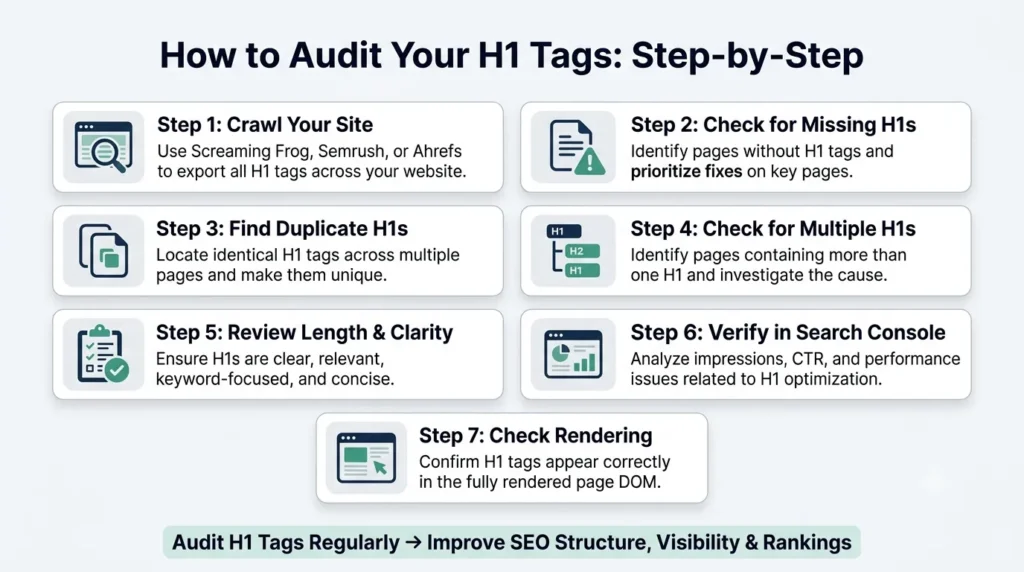
Regular H1 audits keep your on-page SEO in good shape. Here is a practical process:
- Step 1: Crawl Your Site Use Screaming Frog SEO Spider (free up to 500 URLs), Semrush Site Audit, or Ahrefs Site Audit. Export the list of all H1 tags across your domain.
- Step 2: Check for Missing H1s Any page without an H1 tag is leaving a clear structural signal on the table. Prioritise fixing these on your highest-traffic pages first.
- Step 3: Identify Duplicates Sort your crawl export by H1 content. Any identical H1 across two or more pages needs to be rewritten.
- Step 4: Check for Multiple H1s Flag any page where more than one H1 tag appears. Determine whether this is a CMS issue, a template issue, or an intentional decision.
- Step 5: Evaluate Length and Clarity Review each H1 manually. Is it clear? Does it include the target keyword? Is it under 70 characters? Does it accurately reflect the page content?
- Step 6: Test with Google Search Console Cross-reference your most important pages in Google Search Console. Check for pages losing impressions or CTR — weak H1 alignment is often a contributing factor.
- Step 7: Check Rendering For JavaScript-heavy sites or SPAs, use Google’s Rich Results Test or a render-check tool to confirm your H1 is visible in the fully rendered DOM.
How to Add H1 Tags on Major CMS Platforms
1. WordPress (Gutenberg Editor)
- Log in to your WordPress dashboard.
- Open Posts → Add New or edit an existing post.
- At the top, add your title in the “Add Title” field.
- WordPress automatically assigns this title as the H1 tag.
- For additional headings, use the Heading block and select H2, H3, etc.
Tip: Avoid adding another H1 inside the content block.
2. WordPress (Classic Editor)
- Go to Posts → Add New or edit a post.
- Enter your post title in the title field (this becomes the H1).
- In the content editor, use the dropdown menu to select heading levels (H2, H3).
- Do not manually insert another H1 in the body content.
3. Shopify Blog
- Log in to your Shopify admin panel.
- Go to Online Store → Blog Posts.
- Click Add Blog Post or edit an existing one.
- Enter your blog title in the Title field (this is automatically the H1).
- Use the formatting toolbar to add H2 or H3 headings in the content.
4. Wix
- Open your Wix Editor.
- Navigate to your blog post or page.
- Click on the main title text.
- In the text settings, choose “Heading 1 (H1)”.
- Add other headings (H2, H3) for sub-sections as needed.
5. Squarespace
- Log in and open your page or blog post editor.
- Click on the page title area (this is usually set as H1 by default).
- For custom headings, add a text block.
- Select Heading 1 from the formatting options if needed.
- Use H2 and H3 for content hierarchy.
6. Blogger (Blogspot)
- Log in to Blogger.
- Click New Post or edit an existing one.
- Add your blog title (this acts as the H1).
- Highlight text in the editor and choose Heading → Subheading/Minor heading for H2/H3.
- Avoid assigning multiple H1 tags manually.
7. HTML (Manual Coding)
- Open your HTML file.
- Add the H1 tag inside the <body> section
- Ensure only one H1 is used per page.
- Use <h2>, <h3> for subheadings to maintain structure.
H1 Tags and User Experience (UX): The Underrated Connection
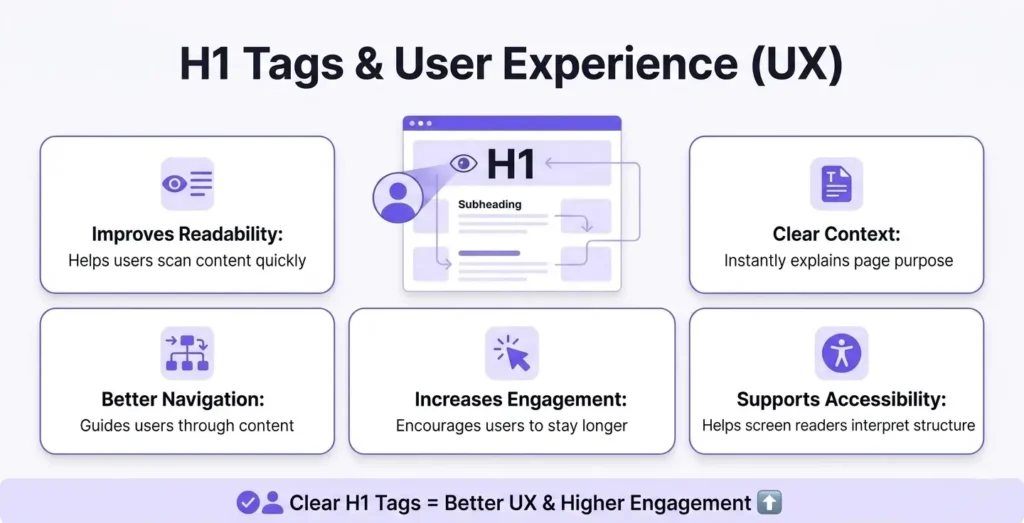
A well-crafted H1 does not just signal relevance to search engines — it shapes how users experience your page in the first three seconds.
When a visitor lands from a search result and sees an H1 that precisely matches their expectation, a cognitive confirmation occurs: I am in the right place. That reduces friction, increases dwell time, and improves the likelihood they will read further or convert.
When the H1 is vague, mismatched, or missing, users hesitate — and often leave. That hesitation shows up in bounce rate data over time.
UX benefits of a well-structured H1:
- Immediate comprehension — Users understand the page purpose in under a second
- Reduced cognitive load — Clear hierarchy makes content easier to scan
- Better accessibility — Screen readers and assistive technologies navigate by heading structure
- Increased engagement — A compelling H1 pulls readers into the content
- Stronger trust signals — Consistency between the SERP title and the H1 builds credibility
Myths About H1 Tags — Debunked
- Myth 1: “Multiple H1s will get you penalised by Google.” False. Google has officially confirmed that multiple H1s are not a ranking penalty. However, for SEO best practice and accessibility, use one H1 per page for clarity.
- Myth 2: “Your H1 must include an exact-match keyword to rank.” False. Google’s language models understand semantic context. A naturally worded H1 that reflects the topic will perform as well or better than an exact-match stuffed heading.
- Myth 3: “The H1 and title tag must be identical.” False. They should share the same topical intent, but varying them allows you to optimise each for its own job — the title tag for clicks, the H1 for on-page comprehension.
- Myth 4: “Optimising your H1 alone will improve your rankings.” False. An H1 tag is one structural signal among many. It supports your content — it does not replace quality, depth, backlinks, or technical SEO.
- Myth 5: “The H1 should always be the longest, most prominent heading.” False. The H1 should be the most important heading, not necessarily the longest. Conciseness is a virtue here.
H1 Tags and On-Page SEO: How They Fit the Bigger Picture
H1 tags do not operate in isolation. They are one layer of a broader on-page SEO strategy. For maximum impact, your H1 should work in harmony with:
- Title tag — Consistent intent, slightly varied phrasing
- Meta description — Reinforces the promise made by the H1
- Introduction paragraph — The first 100–150 words should echo and expand on the H1
- H2 structure — Subtopics that logically branch from the H1’s core claim
- Internal links — Anchor text within the page should reflect the H1’s keyword theme
- Schema markup — Structured data supports the topic declared in your H1
- Image alt text — Visual content should reinforce the page’s core topic
When all of these elements align, Google gets an unmistakably clear signal about what your page covers and that clarity is rewarded.
Final Thoughts
H1 tags are not a magic ranking button. But they are one of the clearest, most direct signals you can give to both users and search engines about what your page covers. In 2026, with AI-powered search becoming a dominant force, that structural clarity matters more than ever.
The best H1 tags are specific, naturally keyword-inclusive, matched to search intent, and consistent with the content that follows. They appear once per page, in clear title case, and they serve both the human reader and the search crawler simultaneously.
Get that right, and your H1 stops being an afterthought and starts being one of the most cost-effective on-page improvements you can make.
FAQs
How Many H1 Tags Should a Page Have?
One. While HTML5 allows multiple H1s in separate <section> or <article> elements, best practice in 2026 is one H1 per page for maximum clarity and topic focus.
Should the H1 Include Keywords?
Yes — naturally. Include your primary keyword in the H1, ideally near the beginning, in a way that reads naturally to a human.
Can the H1 Be the Same as the Title Tag?
They can be similar, but making them slightly different allows each to be optimised for its specific job: the title tag for clicks in search results, the H1 for clarity on the page.
How Long Should an H1 Be?
Aim for 50–70 characters as a practical guideline. Prioritise clarity over length restrictions — an accurate, slightly longer H1 is better than a vague, short one.
Do H1 Tags Directly Improve Rankings?
Not in isolation. They are a structural signal that, alongside quality content, correct keyword use, and strong E-E-A-T, contributes to better ranking performance. A good H1 makes Google’s job easier; that indirectly benefits your rankings.
Are H1 Tags Important for AI Overviews?
Yes — increasingly so. Google’s AI systems rely on well-structured, clearly labelled content to generate summaries. A precise H1 increases the likelihood your page is parsed and cited in AI-generated answers.